QR-code satisfaction surveys. Companies create questionnaires and follow the results; visitors respond on their phones without an account.
Public application
Management requires an account. You may need to create one to explore the app.
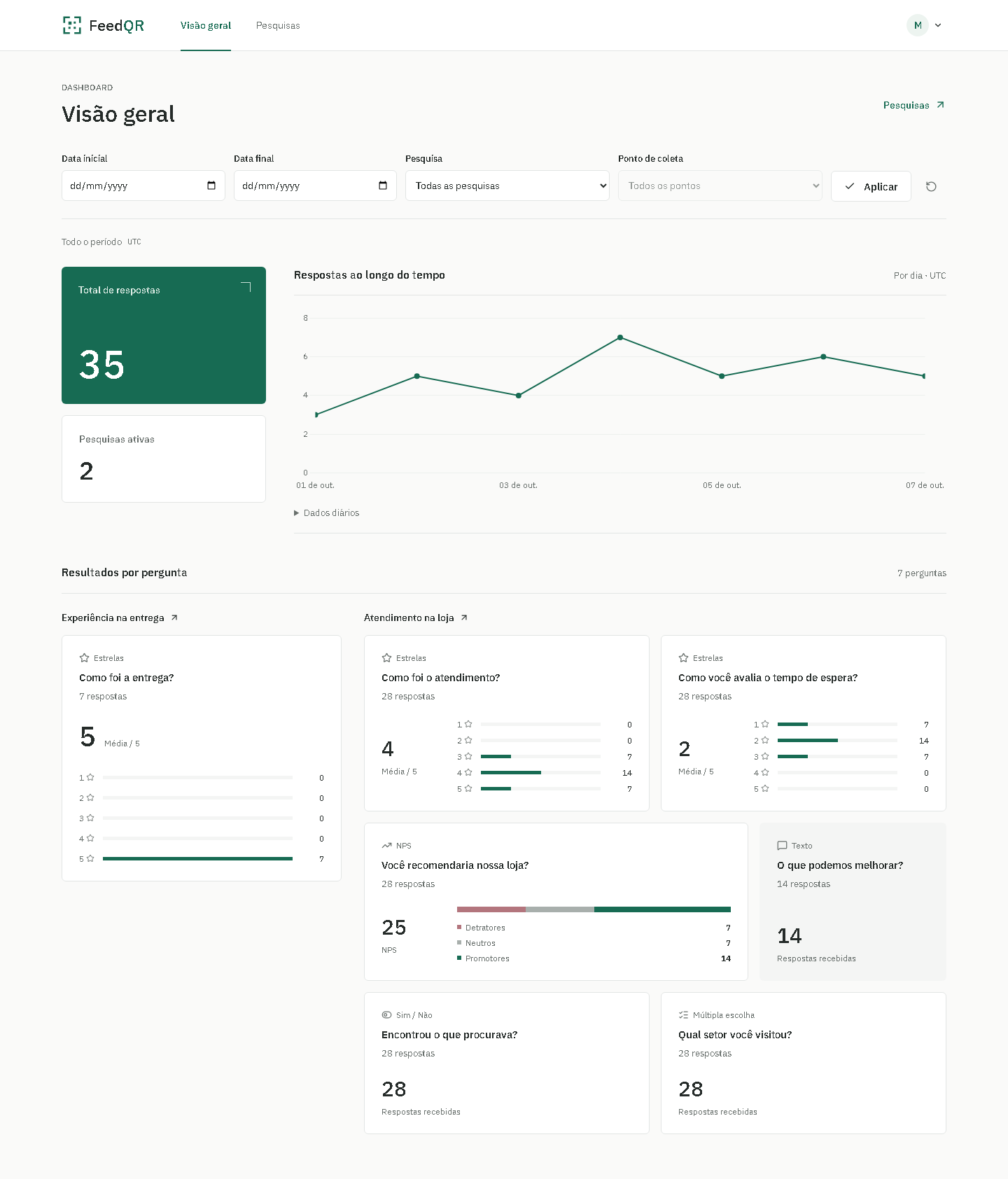
Explore the product.
Desktop capture
1 of 5 — Overview and indicators
Scroll inside the frame to inspect the capture.
Overview and indicators
Date, survey and collection-point filters accompany the indicators and response chart. This capture shows the management overview.
Inside FeedQR.
Management requires authentication and associates data with each company. The diagram follows a public survey submission.
The path of a response.
One review, from submission to confirmation.
Step 1 of 5 — Public interface
Explanatory playback; no data is submitted.
The visitor submits their feedback.
The survey opens on a phone without an account. Visitors answer the questions and submit their feedback.
- The interface checks answers before submission.
- If the connection fails, the attempt is preserved for a retry.
The experience continues.
Your feedback
Your perspective.
My next step.
What does this portfolio communicate to you? Share your rating through FeedQR’s public survey and help guide the next refinements.
The portfolio survey is not available yet. You can already explore the real app through the links below.